
How a 64 by 64 image becomes a Minecraft character
Read a skin PNG as a map of surfaces, not as a tiny portrait.
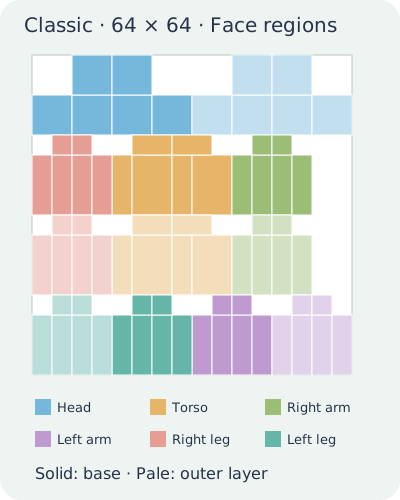
Each face has a place
A skin is a texture laid over a block-shaped model. The front of the head, back of the torso and inside of an arm occupy different rectangles in the file. Nearby surfaces on the character are not necessarily next to each other in the PNG.
The diagram is a map, not a skin
The Classic layout below uses the face coordinates of the JIGAMJISU editor. Colours identify body regions; lighter versions mark outer-layer regions. It explains coordinates and is not intended for import as a finished character.
Check the layer before painting
Some regions belong to the base and others to the outer layer. Do not fill every blank-looking area indiscriminately. Check the selected part and layer so useful transparency does not become an unwanted block of colour.
Resizing is not conversion
A legacy 64 by 32 skin uses a different layout. Stretching it vertically changes pixels without correctly remapping faces. Use an editor that understands the older layout for conversion, and inspect the result from all sides.
Try a reversible marker
On a copy, place a bright mark on a known face and rotate the preview. This helps you learn where a rectangle appears. Remove the mark before exporting and preserve the original file.